MyRadar is a great tool for pilots, but there are some hidden features within MyRadar that many pilots may not be aware of.
Users can configure MyRadar to show the flight route and flight track of any IFR flight in the US. This extremely handy tool allows pilots to check the weather of their intended route of flight, just before the take off. When combined with the Aviation Charts subscription feature, the data can be overlaid on top of these charts to add an extra level of situational awareness with regard to navigational aids and airways!
Here’s how it works; you enter your tail number/flight ID into a menu in MyRadar. Then, whenever you file a flight plan, MyRadar will automatically detect this and plot your flight plan route on the map. The route displayed is as it was defined by ATC; so if you file one way, and ATC changes your route, you’ll see the ATC route on the map.
Once you take off, your flight TRACK will be displayed on the map, in addition to the flight route; the track is updated in real time, roughly every minute or so.
Both the flight track and flight plan track will remain on the map for up to an hour or two after your flight lands, then the track will be removed from the map until you take off again next time.
Here’s a quick walkthrough:
Tap the “Layers” icon:

Then, find the “Aviation” layer, make sure the switch is turned to “ON, then tap the layer itself…

Then, tap the “Flight Plan” option (and again, make sure the switch next to it is turned on)…
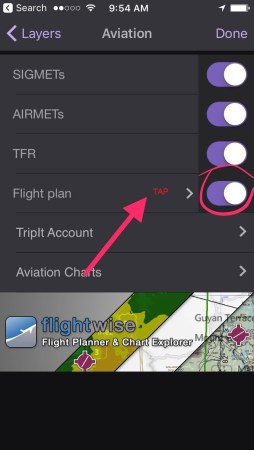
And lastly, enter your tail number or flight ID into the text box, and then tap “Search”…
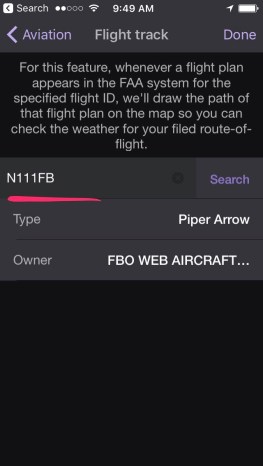
And that’s it! You can tap “Done”, and whenever MyRadar detects a flight plan for your aircraft in the system, it will automatically display it for you. Let us know what you think…!
 MyRadar Weather Radar